Unlock up to $10k per month with Google Grants
Buckle up, non-profit rockstars! Let’s talk about snagging some serious digital firepower like, up to $10K a month in FREE Google Ads. Yeah, you heard that right. Google’s basically throwing down dollars to help you awesome folks get the word out about your cause. And trust me, as a digital marketing girly who's seen it all, this is HUGE. And, totally legit.We see this happen all the time, and the issue is not always the traffic itself.
Think about it: we’re talking potentially dropping over $300 every single day on Google search results. We can get those killer, targeted ads popping up — even those video ones that really grab eyeballs.
Bottom line? We could be looking at around 5,000 fresh faces hitting your website each month, and with the average click costing about two bucks, that’s some serious visibility for a great price.
Now, I know what you might be thinking: “Sounds cool, but also… complicated.”
And that’s where your local digital darlin’s at Digital Savvy comes in.
What is the Google Ad Grants Program?
The secret sauce? It’s this thing called the Google Ad Grants program for nonprofits.
Seriously, it’s like they get that every penny counts when you're changing the world.
How to Get Started
Step 1: Confirm Eligibility
Create a Non-profit Google Ads Account: Don't worry, we've got the Cheat Sheet on the application process down below in this article to make sure you're good to go.
Step 2: Flip the Switch on Those Grants
Once you're approved, we'll walk you through activating that sweet monthly ad budget.
Step 3: Let's Get These Ads LIVE! This is where the magic happens. For a small setup fee, we'll help you
Figure out your main goals: More donations? More volunteers? Spreading the word about a specific program? Let's nail down your customer’s journey.
Dive into the minds of your people: We'll figure out exactly what folks are searching for when they're looking for a cause like yours (think "donate to [your cause] in [your city]" or "[your cause] volunteer opportunities").
Create some seriously catchy ad copy: Craft your wording in a way that grabs their attention and makes people want to click.
Target the right people: We'll make sure your ads are showing up for the folks who are actually interested in what you're doing, and may have some extra time, money or energy to give.
Keep an eye on the numbers: We'll set up all the tracking and create a custom dashboard you can actually understand. This is important so you can see exactly how much of a difference this free ad money is making to your organization.
Look, you're out there hustling every day to make the world a better place. Let us handle the digital megaphone & make the magic happen for you. This Google Ad Grants thing? It's a game-changer. We're the folks who can help you navigate it without the headache, so you can focus on the stuff that truly matters.
Ready to stop leaving that free ad money on the table? Let's chat. We're all about making this easy and effective for non-profits of all shapes and sizes.
Want Step by Step actions?! We’re giving them away!
Get Started through Google here.
Step 1: Confirm Eligibility
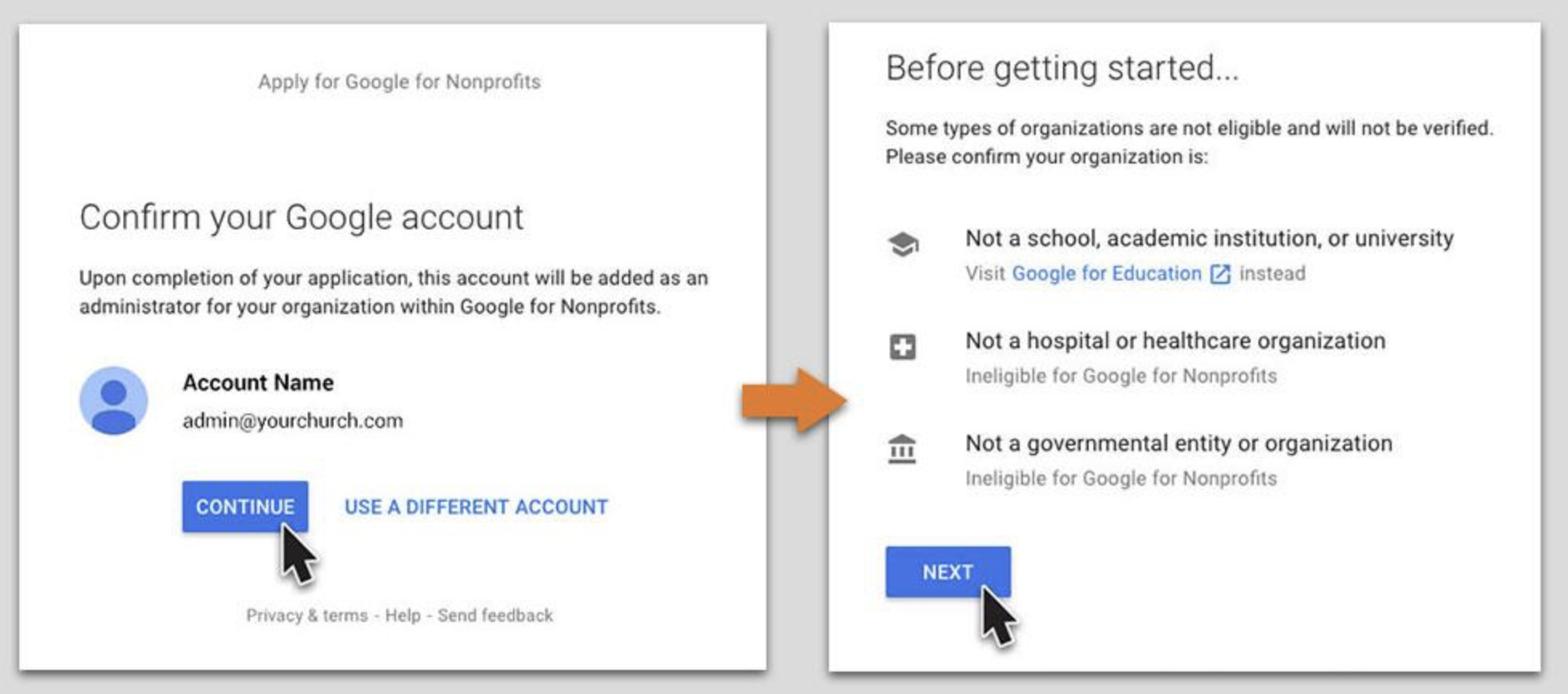
Google Ad Grants are available for eligible nonprofits only. Make sure:
You're a registered 501(c)(3) (in the U.S.) or your country’s equivalent.
Your organization is not a hospital, school, or government entity (though charitable arms may qualify).
For more information and next steps, check out this article from google support.
Step 2: Register with TechSoup
Go to TechSoup.org.
Register your nonprofit and get validated.
You'll receive a Validation Token from TechSoup.
Step 3: Enroll in Google for Nonprofits
Visit Google for Nonprofits.
Sign in with your organization’s email.
Submit your TechSoup validation token.
Wait for approval (can take a few days).
Step 4: Activate Google Ad Grants
Once your org is approved for Google for Nonprofits:
Go to the Google for Nonprofits dashboard.
Select "Activate" under Google Ad Grants.
Complete the pre-qualification process:
Accept the program policies
Set up a basic Google Ads account (without billing info)
Step 5: Create Your Google Ads Account for Ad Grants
You must follow specific guidelines:
Use Search Network only
Set keyword targeting
No single-word keywords
Max $2.00 CPC (unless using a conversion-based smart bidding strategy)
Daily budget: $329 (monthly max of $10,000)
Include at least 2 ad groups per campaign, 2 ads per ad group, and at least 2 site link extensions
Use this link to start the account setup: https://ads.google.com/home/ (choose “Expert Mode” > “Create an account without a campaign”)
Step 6: Submit Your Ads Account for Review
Once your account is set up:
Go back to the Google for Nonprofits dashboard.
Submit the new Google Ads Customer ID for approval.
Google will review it for compliance.